
Does speech recognition remove um? Most of the time, yes. Speech-to-text is built to hand you clean sentences. That is a good default for a text message. It is a problem for a speaking coach, because the ums are the thing you came to work on.
So we asked a plain question: when you say "um" into a recognizer, does it write "um" down? We tested it on real speech where every filler was marked by a person, and the answer depends heavily on which recognizer, which settings and even which runtime you use.
This is a build-log post about one test and what we changed because of it, not a ranking of products.
Why a coach needs a word-for-word transcript
A speaking coach reads what you actually said, not a tidied version of it. That matters most when the habit you are working on is saying um less.
If speech recognition quietly deletes your "um," your restarts ("I think, I think we should") and your repeated words, then any feedback built on the transcript describes a person who does not exist. It would also misquote you. Showing someone a sentence they never said is a fast way to lose their trust.
Recognizers are not wrong to clean up. Most people who dictate want that. But "clean" and "word for word" are two different jobs.
How we tested
We used two public datasets of real speech where every filler is marked in the transcript:
- AMI Meeting Corpus (University of Edinburgh): recorded meetings with headset microphones. We used 27 segments from one meeting, about 400 seconds, with 1,034 reference words and 31 fillers.
- DisfluencySpeech: 250 test clips with 5,490 reference words and 139 fillers. One studio speaker re-performs real phone conversations, so the speech is cleaner than a real answer.
That is 170 marked fillers in total. The test is simple: feed the same audio to each recognizer, line the transcript up against the human reference word by word, and ask:
- Recall: of the fillers that were really said, how many did it write down?
- Precision: of the fillers it wrote down, how many were really said? A recognizer that invents ums fails this one.
- Accuracy and timing: how many words were wrong, and how close were the word times?
What we ran, so you can repeat it:
- Apple: the older on-device SFSpeechRecognizer, on a Mac running macOS 15.6, offline.
- Whisper: whisper.cpp with the open-source
base.enandsmall.enmodels, 4 threads, one word per segment for timing, no temperature fallback so runs are repeatable. Each model ran twice: plain, and with a prompt full of fillers ("Umm, let me think like, hmm...") that nudges the model to write them. - WhisperKit: the Core ML version of
small.enthat runs on Apple hardware, with and without prompts. - Scoring: words lowercased, punctuation stripped, then aligned to the reference with an edit-distance alignment. The filler set was um, uh, er, erm, ah, hmm, mm, mhm and huh. A filler counted only if it was the same filler in the right place. Each clip was run once.
The test scripts are free to download and rerun with any recognizer: sayforth-verbatim-asr-eval.zip (19 KB, MIT license; the datasets come from their original sources). For a quick check of your own, set a timer, answer a question out loud for 60 seconds into any speech-to-text app, and compare its text with what you said.
So, does speech recognition remove um?
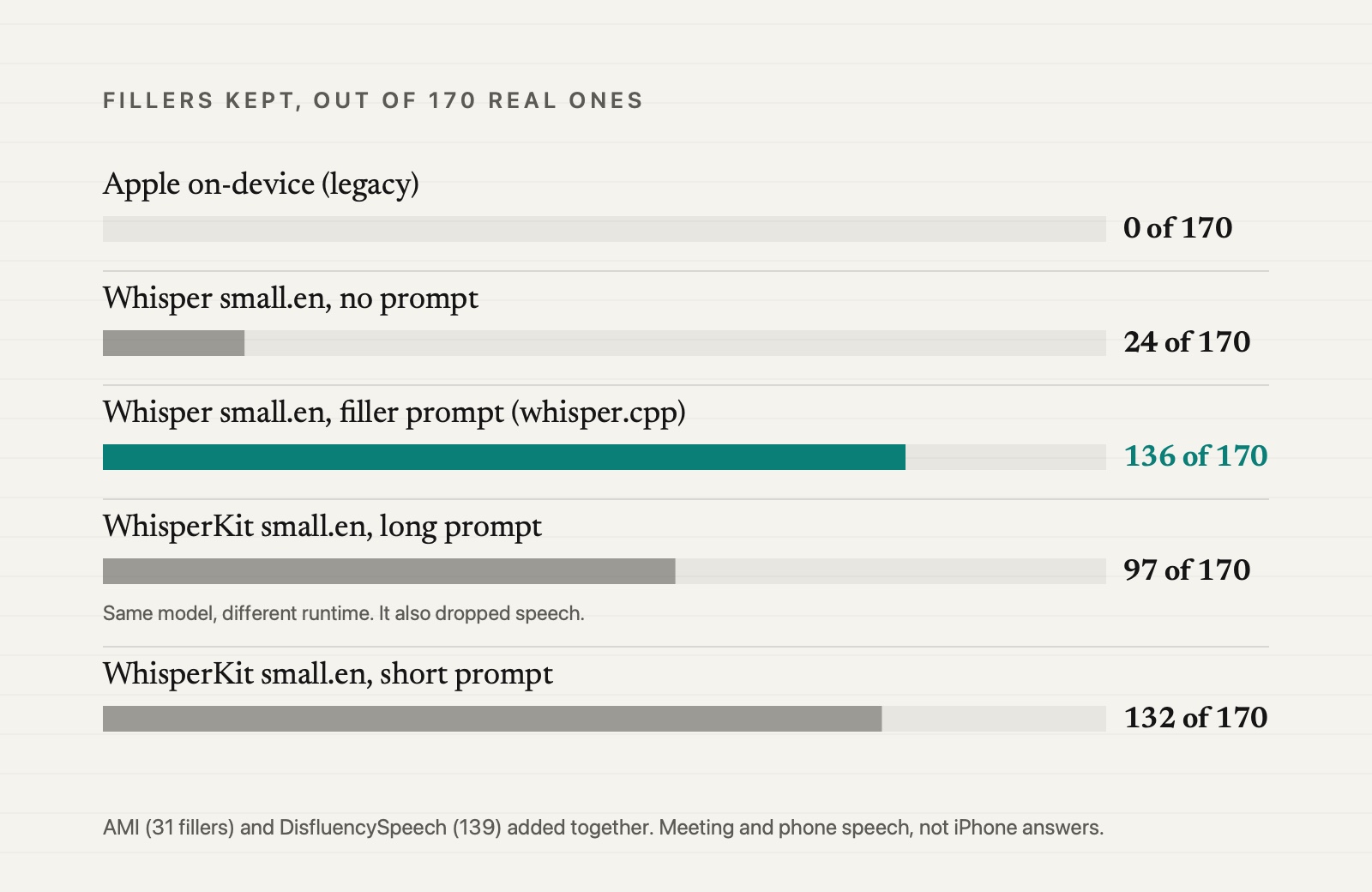
Apple's recognizer kept 0 of the 170 fillers. On the meeting audio it also dropped speech in 7 of the 27 segments, so its word error rate there (45%) was far above Whisper's base.en (13%). On the cleaner phone clips the gap was small: 11.4% against 10.9%.
Whisper with no prompt behaved much the same way. It kept 14 of 170 with base.en and 24 of 170 with small.en. That is roughly 86 to 92 percent of the fillers gone.
Whisper with the filler prompt was a different animal. small.en kept 136 of 170, about 80 percent: 24 of 31 in the meetings and 112 of 139 on the phone clips. It also made fewer word errors (7.2% and 5.1%), and it held on to more restarts and repeated words, which is the other half of what a coach wants to see.
Apple did one thing clearly better: timing. Its word times were off by a median of 0.02 seconds. Whisper's were off by 0.15 to 0.27 seconds, and sometimes by seconds. If you want to know where a pause fell, Apple's clock is the one to trust.
The two WhisperKit bars are the same model on a different runtime, covered below.
The catch: prompts can make things up
A prompt full of ums tells the model that ums are likely. On weak audio, it believed us too much.
With base.en on the meeting audio, 31 of the 57 fillers it wrote were invented, a precision of 46%. One segment ran away entirely: the reference was 74 words, and the output was 132 words ending in "so, um, so, um, so, um" until the clip ran out.
small.en did not do this. On the same audio it wrote 26 fillers and none were invented. On the phone clips, 4 of its 117 were invented, a precision of 96.6%. But we cannot count on a model to behave on every recording, so we added guards.
Two small guards
- A loop check. If any one-to-four-word phrase repeats three or more times in a row, we collapse it to one copy.
- Abstain when unsure. If the two recognizers disagree too much about how many words were said (more than 40 percent), or the guards had to remove more than 30 percent of the fillers, we do not measure fillers for that answer. We show "not measured."
The loop check lifted base.en precision on the meeting audio from 46% to 81% with no loss of recall. Adding the abstain step brought it to 94%. For small.en, precision after both guards was 96.4% on the phone clips and 100% on the meetings.
Two honest notes. First, abstaining costs coverage: small.en abstained on 4 of 250 phone clips (1.6%) but on 8 of 27 meeting segments, mostly because Apple's recognizer had dropped speech and the two no longer agreed. Second, a check we expected to help did not: keeping a filler only if there was real sound energy at its timestamp cost recall and left precision flat, so we left it out.
Same model, different runtime
We also ran the same small.en model through WhisperKit, the version built for Apple hardware.
Without a prompt it behaved like whisper.cpp: it kept 2 of 31 fillers in the meetings and 14 of 139 on the phone clips. Its word timing was the best of the Whisper setups we measured, a median of 0.05 seconds on the meetings (Apple's was 0.02).
With the same long prompt it did not. It kept 52% and 58% of the fillers instead of 77% and 81%, often started in the middle of the clip, and lost 13 to 19 percent of the words. The error rate on the meetings rose to 34.8%, and six phone clips came back empty. A shorter prompt ("Um, uh, so, like, you know, um.") recovered the fillers on the phone clips (113 of 139) but still lost about a tenth of the words.
Same model, same prompt text, different result. The lesson is a practical one: test the exact runtime you ship, not the one in the paper.
What Sayforth does with this
Sayforth is the 30-day speaking program we are building for iPhone. Here is how the test shaped it:
- Open-source Whisper
small.enon the phone for the words, with the short filler prompt ("Um, uh, so, like, you know, um."), so the transcript keeps your ums. - Apple's recognizer for the timing, since it was the most accurate clock.
- Our own checks on top: the loop check, and the abstain rule.
- "Not measured" instead of a guess. When the two disagree too much, we say so rather than show you something we do not trust.
- Your recording stays on your phone. The recognition runs on the device. See the privacy overview.
We combine open-source and built-in speech recognition with checks of our own. We do not claim a model of our own.
Results inside the app
Everything above was measured with command-line tools on a Mac, on meeting and phone speech. The engine that ships inside the app is whisper.cpp running Whisper small.en with beam search, the short filler prompt, the loop check and the "not measured" rule. We ran that exact engine on 20 of the reference clips (12 from DisfluencySpeech and 8 from AMI, 238 seconds of audio) on an M1 Mac, the same chip family as recent iPhones:
- Fillers kept: 83.3%, precision 97.8%, word error rate 5.7%, and the abstain rule did not fire on any clip. The short prompt beat the long one from the tables above (75.9% kept, 7.0% errors), which is why the app uses it.
- Speed: a 90-second answer is transcribed in about 7.2 seconds once the model is loaded. The first load after install takes about 27 seconds; later loads take about a second and a half.
One note: with no Apple recognizer in the loop on the Mac, the disagreement check used the reference transcript's word count instead.
Two things are still to come. Apple's newer iOS 26 recognizer, SpeechTranscriber, could not be tested yet: it reports unsupported in the iOS Simulator, so the on-device comparison has not been run. And numbers measured on real iPhones will be added here once we have them.
What this test does not show
- It is not iPhone speech. AMI is multi-person meetings with crosstalk. DisfluencySpeech is one studio speaker re-performing phone calls, which may favor a prompt, because every um is pronounced clearly.
- The AMI sample is small. 27 segments from one meeting and two speakers, with 31 fillers. Counts for repeats and truncated words are between 1 and 10. Treat the AMI numbers as a signal, not a measurement.
- It is the older Apple recognizer. We tested SFSpeechRecognizer. iOS 26 has a newer one, SpeechTranscriber, and it may behave differently. It reports unsupported in the iOS Simulator, so that comparison is still to come.
- One prompt, two model sizes. We tried one filler prompt on whisper.cpp and did not test larger Whisper models.
- One run per clip. We expect repeat runs to match, but we did not re-check.
None of this says Apple's recognizer is bad. It is doing exactly what it was designed to do: give you clean text. Our job is different, so the setup had to be different.
Credit where it is due
- AMI Meeting Corpus, University of Edinburgh. The recordings and transcripts are released under CC BY 4.0. groups.inf.ed.ac.uk/ami/corpus
- DisfluencySpeech, released under the Apache-2.0 license. Dataset page.
- Whisper (OpenAI), whisper.cpp and WhisperKit are open source; we used the
base.enandsmall.enmodels.
If you want to see where your own ums land, Sayforth is a 30-day iPhone program, coming soon: one short coached answer a day, drawn as a single answer line, with one change to carry into tomorrow.
Be first to know when Sayforth is live.
Get launch updatesFrequently Asked Questions
Does speech-to-text keep filler words like um?
Usually not. In our test Apple's on-device recognizer kept none of 170 marked fillers, and Whisper with no prompt kept between 14 and 24. Whisper with a prompt full of fillers kept about 80 percent, with a risk of inventing a few.
Why does speech recognition remove um and uh?
They are tuned to produce clean, readable text, so they treat fillers, repeats and restarts as noise to skip. That is the right default for dictation and the wrong one for coaching.
Can you make speech recognition write filler words?
Sometimes. A short prompt that contains fillers can make Whisper write them. It can also invent them or loop on weak audio, and the same prompt behaved differently in a different runtime. Test the exact setup you plan to ship.
Does Sayforth upload my recordings?
No. Recognition runs on your iPhone and the recording stays on the phone.