Here is how to give a presentation without reading your slides. Give every slide one sentence that you will say and the room will not see. Cut the slide down to a few cue words that remind you of that sentence. Then glance at the cue, turn to a person, and say the sentence to them. The slide holds the reminder. You hold the point.
Most people who read their slides are not lazy. They wrote good sentences, put them on the screen, and then stood up in front of a room. The words were right there, so they read them. This post shows how to move those sentences off the screen and into your mouth, in six steps, with a five-minute drill you can try today.
Why it is hard to give a presentation without reading your slides
Reading feels like a safety net. If your mind goes blank, the words are on the wall behind you. Nerves make that net very tempting, and once you start reading one slide, it is hard to stop.
The trouble is what the room experiences. People read a line faster than anyone can say it, so they finish your slide before you do. Then they wait while you catch up, and you are telling them something they already know. Your eyes are on the screen, not on them, so it feels like you are presenting to the wall.
There is also a simple test hidden in the habit. A faculty guide on giving talks from Michigan State's biochemistry department puts it bluntly: if you read your slides, "they have too much writing on them" (Michigan State University, BMB faculty talking advice). So the fix starts with the slides, not with willpower.
Step 1: Write the one sentence you will say for each slide
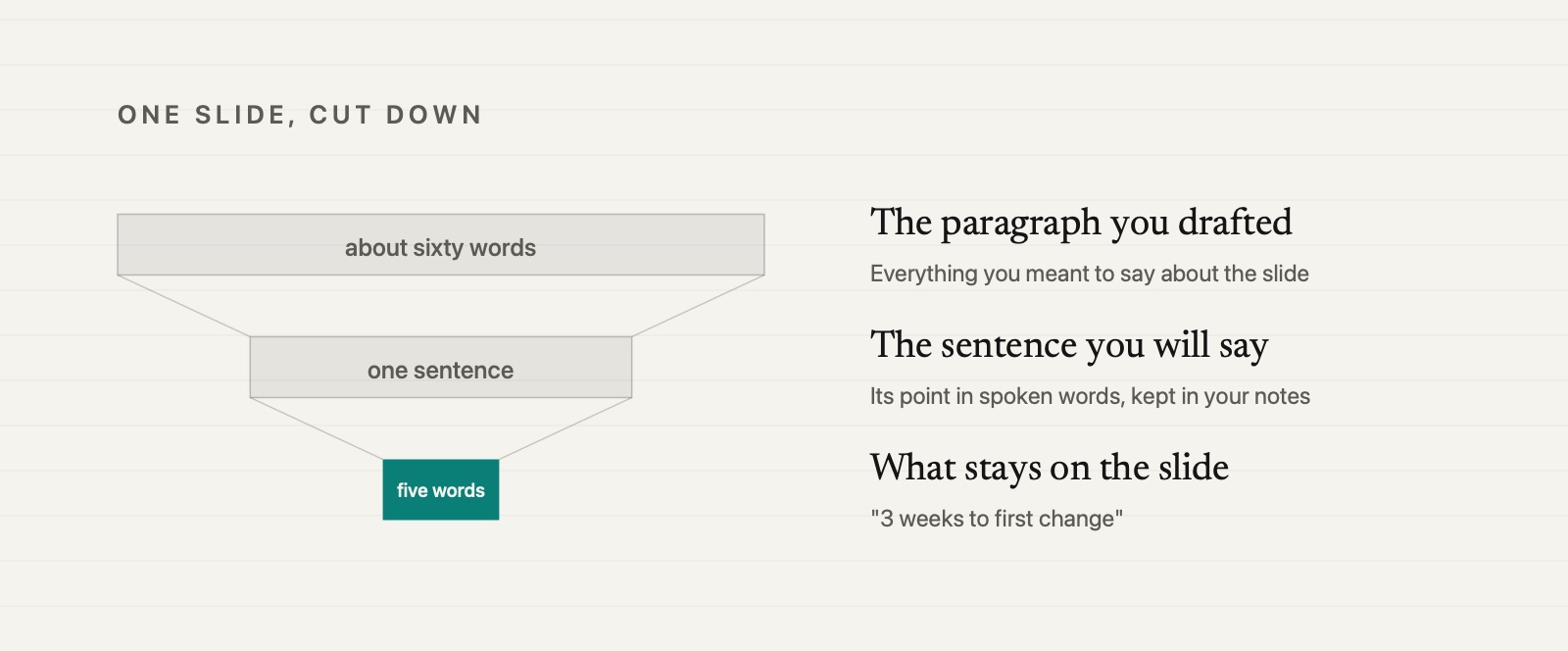
Before you touch the design, go through the deck and write one sentence for each slide. Not a summary of what is on it. The point of it, in the words you would really say out loud.
Here is an example. Say you are proposing a new setup checklist for people joining your team. One slide shows how long a new hire waits before shipping their first change. The sentence for that slide might be: "Right now a new hire waits about three weeks before they ship anything, and most of that wait is setup."
That sentence is the slide. Everything else on the screen is there to support it. If you cannot write the sentence, the slide does not know what it is for yet, and reading it aloud will not fix that.
Put these sentences in your speaker notes, one per slide. They are for you, not for the screen.
Step 2: Cut each slide down to a cue
Now that the sentence lives in your notes, take it off the slide. What stays on screen is a cue: a short phrase, a number, a label on a chart, or a picture. For the setup slide, the cue could be "3 weeks to first change" above a simple timeline.
This is close to what many university guides teach. Boise State's College of Business and Economics tells presenters to "use only keywords or phrases" and to use those key words as a prompt for what to say next (Boise State University, Communication Guidelines). The same page says each slide should carry one idea.
A useful rule when you edit: if the slide already says your sentence, one of you is not needed. Keep the sentence for your voice. Keep the cue for the screen. When people see "3 weeks" and hear you explain why, they get two different things at once, a fact to look at and a reason to listen.
Step 3: Glance at the cue, turn, then speak
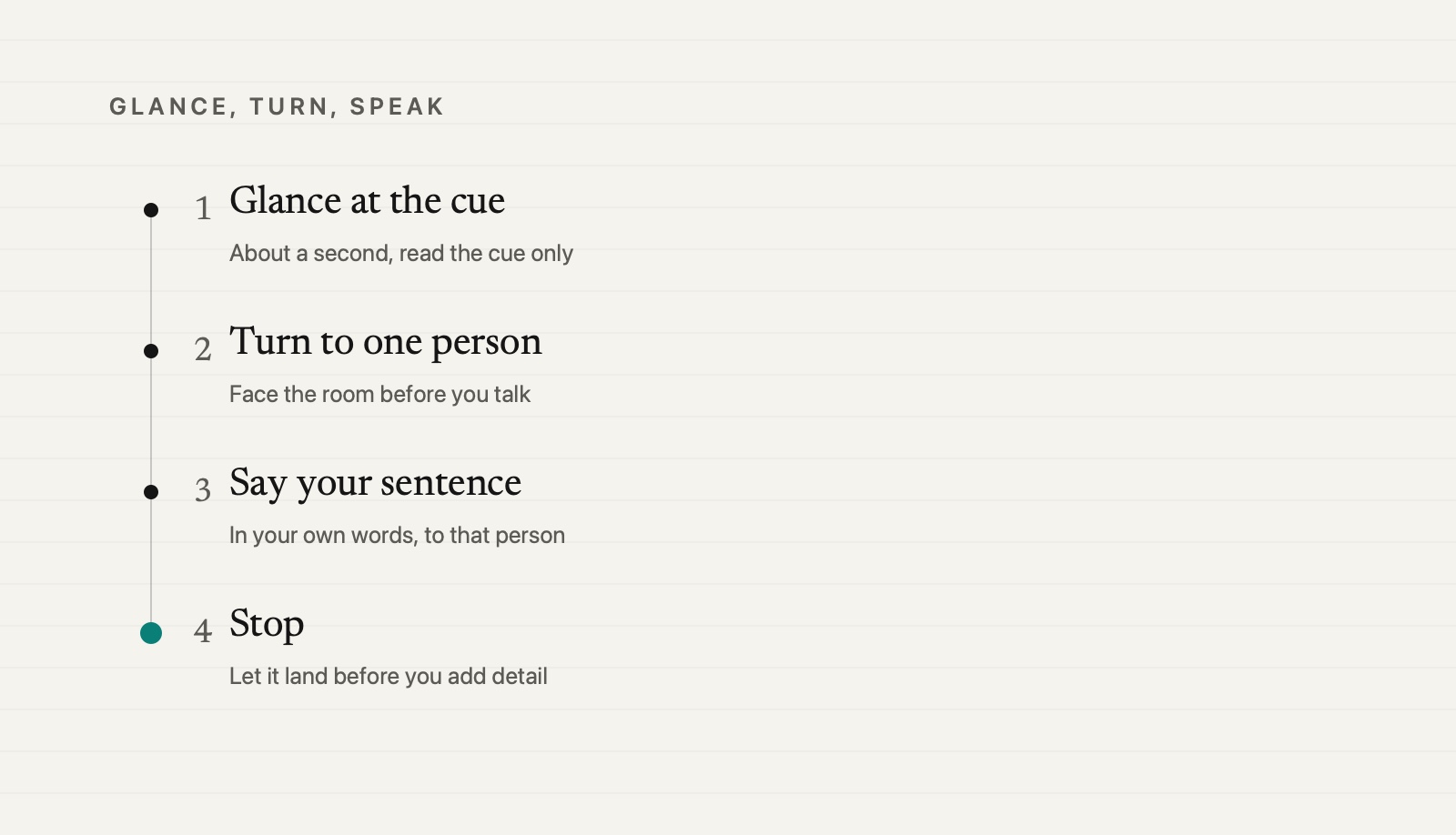
This is the habit that does the real work in how to give a presentation without reading your slides. It has three moves, then a stop.
- Glance. Look at the slide for a second. Read the cue, nothing more.
- Turn. Turn back to the room and find one person.
- Speak. Say your sentence to that person.
The order matters. Most slide reading happens because people talk while they look. Splitting the look from the talk breaks that. You are allowed to look at your slide as often as you like. You just do not speak while you are looking at it.
The Michigan State guide makes the same point from the other side: keep eye contact with your audience and only look at your slides when pointing. In practice, the glance takes about a second. The sentence takes five or ten. Most of the time, your face is toward the room.
When you finish the sentence, stop. Let it land before you add detail. The detail can come from your own words about the chart or the example, and that is where you sound like yourself instead of like the slide.
Step 4: Rest while the slide changes
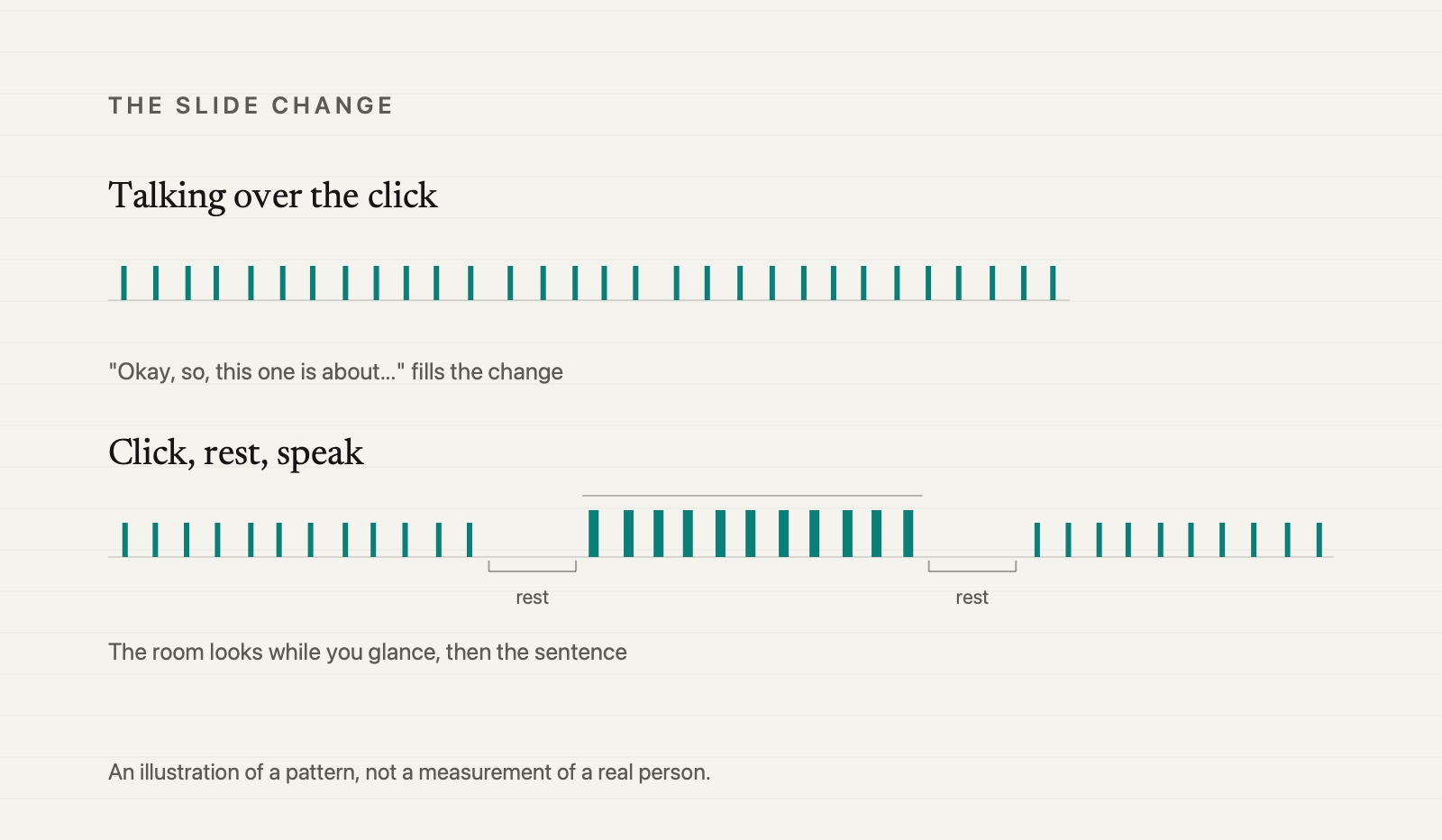
The moment a new slide appears is when reading is most tempting. The room's eyes jump to the screen, and so do yours. Many people fill that gap with "Okay, so, this one is about..." while they work out what the slide says.
Try the opposite. Click, then say nothing for a beat or two. Let the room look at the new slide. Use that same beat for your glance at the cue. Then turn and say your sentence.
This short rest does three things. It gives people time to take in the slide, so they are ready to listen. It gives you time to find your sentence. And it replaces the filler with quiet, which sounds calm rather than lost.
Step 5: Keep your notes to one line per slide
Speaker notes are where slide reading sneaks back in. If your notes hold three paragraphs, you will read the notes instead of the slide, and the room will still be looking at the top of your head.
Keep the notes to the one sentence from Step 1. Make the font big enough to see at a glance from where you stand. If you need a number you might forget, add it after the sentence. That is all.
There are a few times when reading out loud is the right call. A direct quote. A number people need to copy down. Exact wording from a policy or a contract. Read those word for word, and say that you are reading them. Then look up and say, in your own words, what it means for the room.
And if your mind goes blank in the middle, glance at the cue word and say your sentence. If that still does not come, our guide on how to recover when you lose your train of thought has a short way back.
Step 6: Rehearse the sentences with the deck hidden
The steps above only work if the sentences come out of your mouth easily. So rehearse them without the slides. Close the deck, go through your talk in order, and say each slide's sentence out loud. If one sentence keeps stalling, rewrite it in plainer words until it does not.
Then open the deck and run it again, this time with the glance, turn, speak habit. The goal is not to memorize a script. The core of how to give a presentation without reading your slides is to know one sentence per slide so well that a few cue words are enough to bring it back.
For a full rehearsal plan, with the spine of the talk, the joins between sections and timed runs, see how to practice a presentation by yourself. This post covers what happens in the room. That one covers the week before.
Try it now: a five-minute slide drill
You do not need a whole deck to practice giving a presentation without reading your slides. Open any presentation you have, or make up three slides about something you know well, and set a timer.
- Minute one. Pick three slides. For each one, say out loud the single sentence that is its point. Do not look at the slide while you say it.
- Minute two. Rewrite each slide so it shows only a cue: a short phrase, a number or a picture. Move your sentence into the notes.
- Minute three. Run the three slides out loud with glance, turn, speak. Look at a spot on the wall as your "person."
- Minute four. Run them again, and this time rest for a beat after each click before you speak.
- Minute five. Record one more run on your phone and listen to the first slide only. Did the sentence come out in your words, or did you read the cue back in a longer form?
If you find yourself writing every word down because you are not sure the sentence will come out when you need it, that is a speaking habit, and habits change by speaking. Sayforth is an iPhone app, coming soon: a 30-day program with one question a day, answered out loud, shown afterward as a single speaking line so you can see where your main point landed, plus one change to carry into tomorrow. You can read how the daily practice works first.
Be first to know when Sayforth is live.
Notify meFrequently Asked Questions
Is it bad to read off your slides when you present?
Reading the occasional quote or exact number is fine. Reading whole slides usually is not, because the room reads faster than you speak and finishes before you, and your eyes stay on the screen instead of on them. Put a few cue words on the slide and say the sentence in your own words.
How do you remember what to say without reading the slides?
Give each slide one sentence that is its point and practice saying those sentences out loud in order. Leave a short cue on the slide, like a phrase or a number, that brings the sentence back. A one-line note per slide is a good backup.
Should you memorize your presentation word for word?
For most work talks, no. A memorized script breaks easily when you lose one word, and it tends to sound recited. Know one sentence per slide well, plus your opening and closing lines, and use your own words for the rest.
How much text should be on a presentation slide?
There is no single rule, but less than most people use. Many university guides suggest one idea per slide and keywords or short phrases instead of full sentences. If you could give the talk by reading the slide, it has too much text on it.